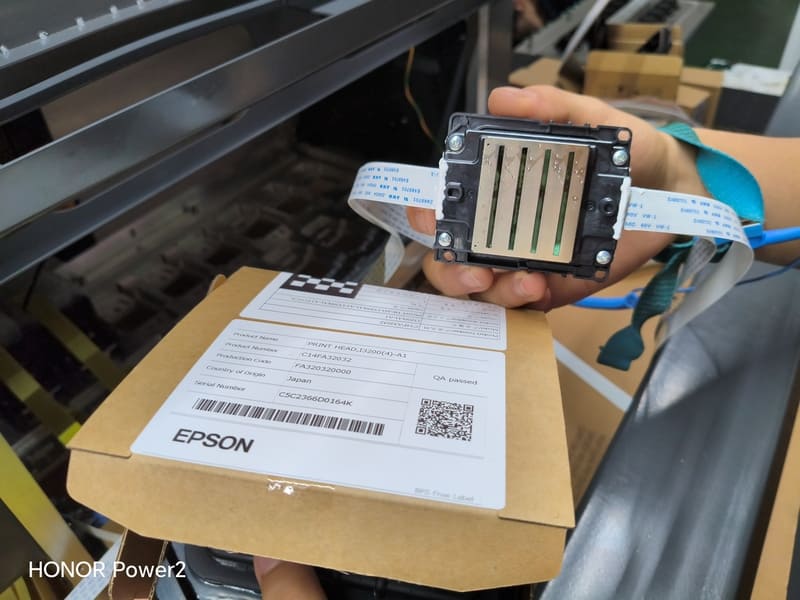
A digital printer with Epson nozzle has become the standard answer to a problem that print shops and brand owners both recognise: the gap between a beautiful concept and a package a client can hold. Prototypes, mock-ups, and pre-production samples used to mean either a slow hand-build or an expensive short plate run. A digital press collapses that gap to a file and a few minutes, and the piezoelectric nozzle technology is the reason the output looks like a finished print rather than a draft.
I have spent 15+ years on the export side of packaging machinery, and I have watched how customers actually use these machines. The ones who get the most out of them are not the largest plants. They are the print shops and design-led converters who treat the digital press as a sales tool as much as a production line — a way to get a client's signature on a design in a meeting instead of a week later.
In one sentence: a digital printer with Epson nozzle produces photo-grade detail because piezoelectric nozzles give precise, variable control over every drop — which is what makes it suitable for both prototype mock-ups and the short production runs that follow.
Why Print Shops Keep a Digital Press Beside Analog Equipment
A commercial print shop rarely replaces anything with a digital press. It adds one, because the two technologies serve different parts of the same customer relationship. Offset and flexo win on long runs where the set-up cost is amortised across thousands of impressions. Digital wins on everything that comes before or around those runs: the concept sample, the client review, the limited edition, the urgent reprint of a design that changed after approval.
The commercial logic is straightforward. A shop that can produce a physical sample within the same working day closes design decisions faster, and a design decision that closes faster moves the whole project forward. Shops we work with tell us the same thing repeatedly: the prototype work pays for the machine's floor space long before the short-run production does, because it shortens the sales cycle for everything else they sell.
What "Epson Nozzle" Means Technically
The mechanism matters because it explains the output quality. Epson Micro Piezo printheads use a piezoelectric element that flexes when voltage is applied, pushing a precisely measured volume of ink out of the nozzle. Because the action is mechanical rather than thermal, the drop size can be varied across a range and the nozzle can fire reliably at high frequency without the degradation that heat-based systems experience over long production periods.
That control produces the characteristics people describe as photo-grade: smooth halftones without visible banding, clean edges on fine type, and the ability to place small drops for detail and larger drops for solid coverage on the same sheet. In our range, Epson-based configurations are available with 8, 12, 16, 24, or 32 printheads at either 600 or 1200 DPI, and they support five colours — cyan, magenta, yellow, black, and white. The head count follows print width and throughput requirements; the quality comes from the head family and the DPI setting, not from counting heads.
One point worth stating plainly for buyers who hear the names used interchangeably: head families are not equivalent, and the choice should follow the job. Piezoelectric Epson heads are the right answer where fine detail and colour accuracy matter most. Industrial heads from Xaar and Seiko are built for heavier duty cycles and coarser substrates, trading some finesse for durability and volume. A shop doing prototype work on coated stock and kraft board wants the former.
What Prototype Work Actually Demands
Prototyping sounds like an easy use case. It is not, for a specific reason: a mock-up is judged against the finished product, so any weakness is immediately obvious. Clients hold the sample, turn it in the light, and compare it with the screen they designed it on. Three requirements follow.
- Detail fidelity. Fine type, thin rules, and small icons have to reproduce cleanly, because a cluttered or broken logo is the first thing a client notices and the last thing they forgive.
- Colour confidence. The sample has to represent the intended colour closely enough for an approval decision to be meaningful. This is the practical argument for 1200 DPI configurations and digital colour matching rather than operator guesswork.
- Turnaround. A prototype that arrives next week is a document. A prototype that arrives in the meeting is a decision. Speed is the entire value of the exercise.
There is a fourth requirement specific to packaging: mock-ups are often built on non-white or coloured board, particularly for the kraft and recycled looks that are popular in food and beverage. Printing full-colour artwork directly onto a brown liner mutes everything, which makes the sample look worse than the real job will. A five-colour CMYKW configuration solves this by laying an opaque white base first, so the prototype shows the design as it will actually appear.
From Mock-Up to Production on the Same Machine
The reason a digital press earns more than its prototype value is that it does not stop when the sample is approved. Because there are no plates, the approved file can go straight into production without a second set-up process and without a second quality conversation. What the client signed off on is what runs.
This continuity matters more than it sounds. In an analog workflow, the approved prototype and the production run are two different processes, and small differences creep in between them. In a digital workflow, the sample and the run come off the same machine with the same settings recalled from a preset. That removes an entire category of disputes, and it also means a shop can print a genuine short production run from a single box upward without the economics collapsing — which is how mock-up work turns into a revenue stream instead of a cost centre.
| Stage | Analog workflow | Digital press workflow |
|---|---|---|
| First physical sample | Plate or hand build, scheduled into a production queue | Printed from file, typically the same day |
| Design revisions | Each version may require a new plate | A new file and a one-minute changeover |
| Approval to production | Separate process, with settings re-established | Same machine, same stored recipe, same result |
| Small quantity runs | Set-up cost dominates the unit price | Viable from very low quantities upward |
Choosing a Digital Printer with Epson Nozzle for Prototype and Short-Run Work
Four specifications decide most of the outcome. Print width should match the largest mock-up or carton you expect to produce — common steps across our range include 264 mm, 400 mm, 525 mm, 795 mm, and 1050 mm, with industrial platforms reaching 1800 mm. DPI should be 1200 if fine detail is central to your work and 600 if throughput matters more than the last increment of sharpness. Head count should follow width, not ambition. And the colour set should include white if any of your samples or runs will sit on non-white board.
Beyond the specification, look at the two things that determine whether the machine is usable in a real shop. The feed section should offer automatic leading-edge feeding for repeatable registration when you run a queue of different jobs back to back. And the machine should be able to connect to your production systems, so job data and specifications flow without re-entry — which matters most in a shop producing many small, different jobs every day. You can compare head families on our printhead overview or look at the Epson series page.
A Print Shop That Changed How It Sells
A print shop in Southeast Asia bought a digital press primarily to stop outsourcing its sample work. Their existing process meant sending prototype requests to a third party and waiting, which was frustrating for their clients and expensive for them. Within a few months of bringing the work in-house, something more interesting happened. Their sales team started bringing printed mock-ups to client meetings instead of screenshots.
The shop's own assessment was blunt: conversations moved faster because the client could hold the design, and approvals that used to take two rounds of emails were closing in the room. They then began printing small initial production orders on the same machine, because the approved mock-up and the production run required no transfer between processes. The press had been justified on prototyping. It earned its place on the sales floor.
FAQ — Prototype and Short-Run Printing
Can a digital printer with Epson nozzle replace offset for production?
For short and medium runs on packaging substrates, often yes. For very long runs where set-up cost is fully amortised, analog equipment still usually wins. Most shops run both side by side.
Do I need 1200 DPI for prototype work?
It helps most where fine type, thin rules, and photographic imagery are central. If your samples are large graphics with simple type, 600 DPI with a well-matched drop profile will often be enough.
Can it print mock-ups on kraft or coloured board?
Yes, and this is where a five-colour CMYKW configuration matters. An opaque white base keeps the artwork looking like the finished design instead of a muted version of it.
How many heads do I need for mixed prototype and production work?
Head count is set by print width and speed, not by job type. Choose the width that covers your largest work, then add heads to reach the throughput you need.
Final Word: The Prototype Is the Sales Argument
A digital printer with Epson nozzle earns its keep in two places at once. On the shop floor it removes the set-up barrier that makes short runs expensive. In front of a client it turns an abstract approval conversation into a physical one. Shops that understand the second point get more value from the same machine, because they are not just printing samples — they are closing decisions.
Send us the substrates you sample on and the artwork you most often mock up. Our technical team will tell you which head count, DPI setting, and colour configuration produce the closest match to your finished production work.
Printing prototypes and short runs in-house?
Compare the 600 and 1200 DPI Epson-based configurations and see which suits your sample workload.
Compare Epson-Head ConfigurationsSend us a mock-up file and your substrate
We will print it on a digital printer with Epson nozzle and send the sample back, so you can judge the detail yourself.
Request a Prototype Sample