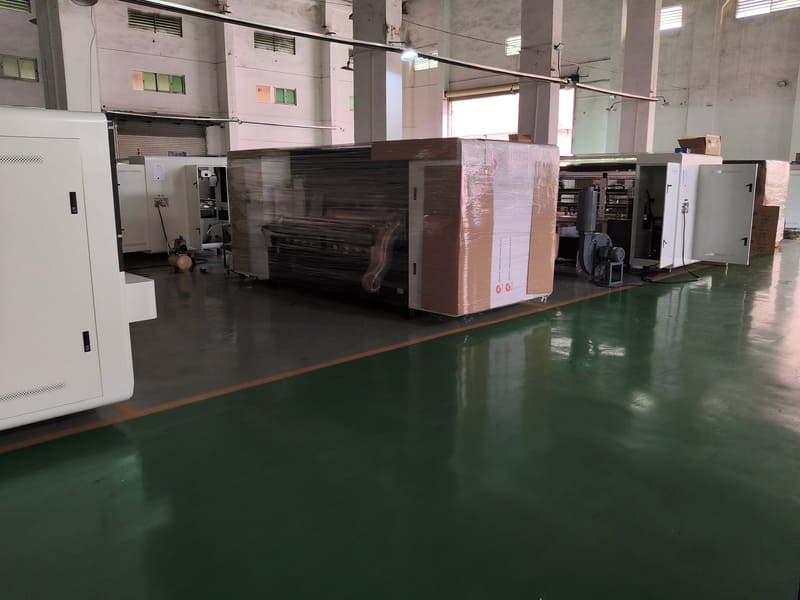
A digital printing machine almost never arrives to replace a working flexo line. It arrives to take over a slice of the work — the short runs, the frequent design changes, the jobs that keep a plate room busy for no good reason. Where you physically put it, and how its output rejoins the finishing equipment you already own, decides whether that plan succeeds. I have walked through enough plants to say this plainly: on most projects the layout question is harder than the machine question.
I work on the export side of packaging machinery, and much of my job is sitting down with a plant manager and a floor plan rather than talking about printheads. The pattern repeats. A converter has one or two flexo lines, a slotter, a stacker, limited floor space, and a growing pile of small orders that lose money on make-ready. They ask which digital printing machine to buy. The better first question is where the machine will live and which step of the existing flow it will hand off to — because that answer filters the machine list far faster than a spec sheet does.
In one sentence: the digital press should be positioned where board flows in easily and printed sheets can rejoin the finishing equipment you already run, so the plant gains a second production route without building a second plant.
Start With the Flow, Not the Footprint
Every packaging plant already has a dominant direction of travel: board comes in one end, printed and finished boxes leave the other. A digital press added without regard to that direction creates a loop, and loops cost money. Board gets staged twice, printed sheets get trucked across the building, and an operator spends the shift walking instead of running the machine. Before any dimensions are discussed, trace the existing route from the board store to the dispatch bay and find the shortest branch off it.
The second thing to trace is the finishing equipment. If your flexo line feeds a rotary slotter and an automatic stacker, you already own the expensive part of the process. A digital press that can deliver printed board to that same slotter inherits the whole downstream workflow for free, and that changes the payback maths on the project far more than a modest difference in print speed ever will.
The Three Layouts We See in the Field
Across the installations we have been involved in, digital presses slot into existing plants in three recognisable patterns. Each has a different cost profile and suits a different order mix, and none of them is universally right.
| Layout | How it is built | Best suited to |
|---|---|---|
| Standalone cell | Digital press prints and discharges board; a manual or powered truck moves it to an existing slotter | Plants testing the digital route on a limited job range before committing floor space |
| In-line finishing | Printing unit coupled to a slotting unit and an automatic stacking unit as one continuous line | Plants with steady short-run volume that want printed boxes leaving the line dispatch-ready |
| Hybrid branch | Digital press sits beside the flexo line and shares the existing finishing train and board store | Plants where both technologies must run every day and share labour across shifts |
In our experience the hybrid branch is the most common outcome, and it is also the one that needs the most careful planning. Sharing finishing equipment sounds efficient until you measure the queue. If the flexo line is already feeding the slotter at full rate, adding a second source of board does not create capacity — it creates a waiting list. The fix is usually scheduling, not steel: route the digital jobs into the finishing window when the flexo line is down for plate changes anyway.
What the Machine Asks of the Building
The physical services are where surprises appear late and cost real money. A digital press of this class is a substantial piece of equipment — our single-pass and Epson-based platforms sit around 3000 kg, and the widest industrial configurations reach roughly 3500 kg — so the load has to be carried by a slab, not by a light mezzanine. Floor flatness matters as much as strength, because a press that levels poorly will keep registration drifting no matter how well it is tuned.
Then come the quieter requirements. Power supply must match the curing system, which is the largest single electrical draw on a UV-configured machine. Compressed air, if the machine uses it for tensioning or pneumatic clamps, has to be clean and dry. Dust control near the feed section is not a decoration — a fine layer of board dust on a printhead is one of the most common causes of a dropped nozzle we see in the field. And ventilation around the curing zone should be planned at layout stage, because retrofitting ductwork into a working plant is far more disruptive than designing it in.
The Real Bottleneck: Board Logistics and the Feed Section
Here is the part of the layout that gets drawn last and matters most. A digital press prints a new job every few minutes, which means it changes the demand pattern on the board store completely. A flexo line might consume one board grade for a whole shift; a digital press may run five grades before lunch, in quantities far too small to justify palletising each one. If the board store is at the far end of the building, an operator will spend a surprising share of the shift collecting stock instead of printing.
The feed section deserves equal attention. Our platforms are available with semi-automatic or fully automatic leading-edge feeding. In a plant where the press runs short jobs back to back, the automatic option is not a luxury — it is what keeps the line moving between jobs and what holds registration steady when the substrate grade changes. In a layout, that means leaving enough clear space in front of the feed so an operator can load the next stack without squeezing past a pallet. It sounds trivial until you watch it done badly for a week.
Deciding the Job Split Between Flexo and Digital
A layout only works if the scheduling rule behind it is clear. The rule we recommend to customers is simple and has nothing to do with machine capability: digital takes the jobs where setup dominates the cost, flexo keeps the jobs where run length dominates. Anything requiring a plate change more than once a shift goes digital. Anything that will run for days on a single plate stays on flexo.
That rule keeps both lines busy and prevents the most expensive layout mistake — buying a digital printing machine and then running only long, repetitive work on it. I have seen this happen. A plant invested in a fast single-pass press, then routed its biggest long-run cereal cartons to it because the machine looked modern. Changeover was quick, throughput was high, and the plant still lost efficiency, because the flexo line that used to run those cartons now sat idle half the week while the digital press absorbed all the volume and all the maintenance. The machine was fine. The routing rule was missing.
A Layout Walkthrough From a Plant We Worked With
A converter in Eastern Europe came to us with a classic problem: two flexo lines, one shared slotter, and a customer list that had drifted toward small promotional orders. Their first proposal was to place the new press in an empty bay on the opposite side of the building, next to the board store. It looked tidy on paper. It was also wrong, because every printed sheet would have needed a trip across the floor to reach the only slotter.
We redrew it. The press went into a bay adjacent to the flexo line, fed from a shared board store, and discharged into the existing finishing train. Because the digital jobs were short, they were scheduled into the slotter's idle windows — the periods when the flexo line was stopped for a plate change. Within a few weeks the plant reported that the new machine had not created a single extra queue, and the promotional work had moved off the flexo lines entirely. Same press, same site, different route. The layout did the work.
Where a Digital Printing Machine Earns Its Space
Once the press is positioned correctly, three things become possible that were not before. Jobs can be quoted profitably at quantities that used to be loss-making, because the plate and make-ready cost disappears from the calculation. Versioning becomes practical — regional variants, seasonal designs, or customer-specific panels can run in one continuous sequence without stopping the line for a plate change. And the flexo lines get their capacity back, which is quietly the largest benefit of all. A plant that frees its main presses to run what they are good at has effectively added capacity without adding a building.
The machines themselves support that flexibility. Our full range is available in scanning, single-pass, and two-in-one configurations, with print widths from 200 mm to 1800 mm depending on platform and head family, and the full range can be connected to a plant ERP system so job data flows without manual re-entry. If your plant is going to run two production routes side by side, having them speak the same data language is what keeps the schedule honest. You can see how the platforms group on our two-in-one series page, and the inline configuration is described under the five-colour line configuration.
FAQ — Fitting a Digital Press Into an Existing Plant
Do I need to build a new hall for a digital printing machine?
Usually not. Most of our customers place the press in an existing bay. The real constraints are floor load, flatness, power, and dust control in the feed area, not ceiling height or total area.
Can the digital press share the existing slotter and stacker?
Yes, and sharing is usually the most economical layout. The catch is scheduling — plan the digital jobs into the windows when the flexo line is already stopped, so you add output rather than a queue.
How much clear space should be left around the machine?
Enough for a loaded pallet or stack in front of the feed and full access to the print bar side for daily nozzle checks. Space for maintenance access is not optional on an inkjet press.
Should the new press be in-line from day one?
Not necessarily. Many plants start with a standalone cell to prove the workflow, then add in-line finishing once the order mix is confirmed. Building in the space from the start keeps that option open.
Final Word: Draw the Route Before You Choose the Machine
Fitting a digital printing machine into an existing flexo plant is a logistics exercise dressed up as a purchasing decision. Get the route right — board in from the shared store, printed sheets out to the equipment you already own, digital jobs scheduled into the gaps — and almost any well-configured press will perform. Get it wrong and even a fast machine will sit in a corner while operators walk past it carrying pallets.
Send us your floor plan and your current job list, and our technical team will mark up where the press should stand and which jobs it should take. It is a short conversation, and it usually changes the project more than the machine choice does.
Planning a second production route?
Study the platform widths, head counts, and inline options before you commit floor space to a layout.
Review the Platform Line-UpSend us the floor plan, not just the spec list
We will mark up the board route, the feed position, and the handoff from your digital printing machine to the existing finishing line.
Get a Layout Review