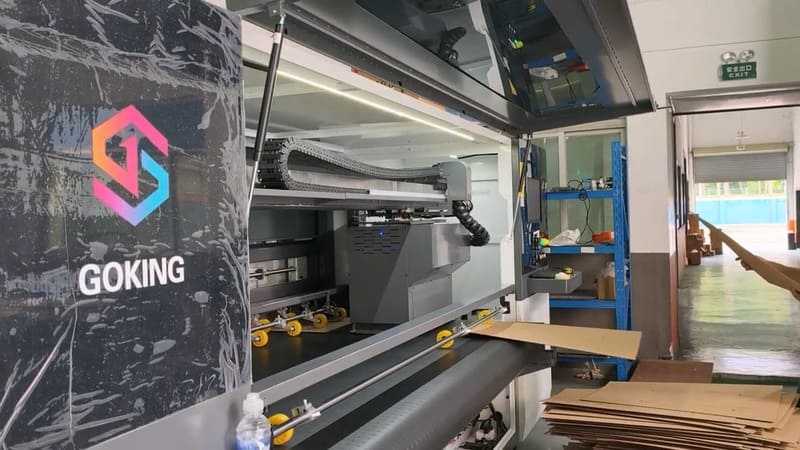
Most plants do not have one order profile. They have several running side by side: a handful of long, stable jobs that keep the lights on, a stream of short promotional work, and a few awkward substrates that fit neither pattern. Buying two machines to cover that range is expensive and often idle. A single pass and multi-pass 2-in-1 digital print machine exists because the alternative — one platform that produces in both modes — matches how a real order book actually looks.
I have spent 15+ years on the export side of packaging machinery, and the customers who ask about two-in-one configurations are usually the ones who have already been through the single-technology decision and found it uncomfortable. They have a mixture of jobs, and every evaluation they run forces them to choose which half of their business to serve well. This article is about how the two-in-one platform resolves that choice, and where it still involves a real trade-off.
In one sentence: a single pass and multi-pass 2-in-1 digital print machine combines a moving scanning bar and a fixed direct-output bar in one platform, so the same press can build fine detail over multiple passes or print at production speed in a single engagement, depending on the job in front of it.
Two Modes, One Platform
The mechanical distinction is worth restating because everything else follows from it. In scanning mode, a print bar travels across the board and lays the image down in successive passes, stepping along as it goes. That builds density gradually and tolerates uneven or thick substrates well. In direct-output mode — single-pass — a fixed bar spans the print width and the board passes underneath once, which is how these presses reach sustained production speeds measured in metres per minute.
A two-in-one platform supports both arrangements. In our GJ series the machine combines multi-pass and single-pass operation in one unit, so a plant does not have to dedicate a press to one operating principle. The switching decision is a production decision made at the start of a job, not a machine decision made once at purchase — which is the entire point.
The Order Book That Makes This Necessary
Manufacturers like to describe an order book as if it were uniform. It rarely is. In our experience a typical converter's month contains four kinds of work, and they pull the equipment decision in different directions.
| Type of work | What it needs | Preferred mode |
|---|---|---|
| Long, stable, high-volume line | Maximum throughput and consistent output hour after hour | Direct output |
| Short promotional runs | Fast changeover and the ability to run from low quantities | Either, provided changeover is quick |
| Detail-critical packaging | Dense colour, fine gradation, sharp small type | Scanning |
| Heavy or awkward board | Tolerance of thickness and slight unevenness | Scanning |
A plant with all four columns in its order book faces an unpleasant choice if it buys a single-mode press: either it turns work away, or it accepts lower quality or slower output on part of its range. That is the problem the two-in-one configuration was designed to solve, and it is why the customers who ask about it are usually the ones with the messiest schedules.
A Decision Rule You Can Actually Use
A machine with two modes is only useful if the team knows when to use which. Without a rule, operators default to one mode and the second capability sits unused. The rule we suggest to customers is deliberately simple, and it is based on order characteristics rather than on machine preferences.
- Direct output when the run is long and the board is standard. If the job will occupy the machine for hours and the substrate is a grade you run every week, throughput is the only thing that matters.
- Scanning when the artwork is demanding. Dense colour blocks, fine gradations, small reversed type, or photographic imagery are where layering over multiple passes pays off.
- Scanning when the board is difficult. Heavy double wall, honeycomb cores, mounted board, and sheets with any warp are more forgiving in scanning mode.
- Direct output when the queue is the constraint. If the schedule is backed up with straightforward work, run it in the fast mode and keep the detail work for when the queue eases.
What One Line Instead of Two Changes
The operational benefits go beyond the obvious space saving. A single platform means one set of consumables, one maintenance routine, one set of operator skills, and one place where jobs queue. In a plant running two separate presses, the schedule has to be kept in balance across both, and when one machine goes down, half the order book has nowhere to go. On a two-in-one platform, a stoppage affects throughput rather than the range of work you can accept.
Floor space is the benefit people mention first, and it is real: a machine of this class occupies a substantial footprint and needs clear space for loading and maintenance access. But our customers tend to report the schedule benefit as more valuable over time. Having one place where every job is queued makes daily planning simpler, and it removes the political arguments about which product line gets the fast machine.
The Trade-Off You Should Still Consider
A two-in-one platform is not a machine that does everything at maximum capability simultaneously. In direct-output mode it reaches the throughput a dedicated single-pass press achieves; in scanning mode it produces the detail a dedicated scanning press produces. What it does not do is both at once, and any plant whose entire volume sits firmly in one category may still be better served by the dedicated machine, which can be simpler and more cost-effective for that single task.
The honest way to decide is to count. If more than a small fraction of your work sits in the second category, the two-in-one configuration usually wins on total cost of ownership, because the alternative is two machines with two sets of idle hours. If essentially all your work is one type, say so and buy accordingly — we will tell you the same thing. Our two-in-one platforms are grouped on the two-in-one series page, and the five-colour direct-output configurations are listed under the five-colour line page.
What to Look For in a Two-in-One Machine
Four practical questions separate a well-designed two-in-one platform from a compromise. How long does a mode change actually take, and does it require tools or a specialist? Does the machine store separate recipes for each mode and each board grade, so switching does not mean re-tuning from scratch? Is the feed section automatic, given that a platform running varied jobs will load differently for each one? And can the machine connect to your production systems so that job data, including which mode a job should run in, arrives without re-entry.
That last point matters more than it sounds. If the mode decision is documented in the job data and pulled automatically, the rule gets followed. If it depends on an operator remembering, the fast mode will be used for everything. Our full range can be connected to a plant ERP system, and the platforms can be linked to a high-speed printing unit, a slotting unit, and an automatic stacking unit so that printed board moves into finishing without a manual handling step.
A Plant That Stopped Choosing
A converter in Southern Europe spent two years evaluating digital printing and kept stalling. Their order book included long runs of standard retail cases, a growing stream of promotional work, and a smaller amount of heavy display board for point-of-sale customers. Every single-mode proposal they received required them to give up on part of that mix.
They installed a single pass and multi-pass 2-in-1 digital print machine instead, with a written rule for mode selection that was agreed with the production team before installation. Long standard runs go through in direct output. Promotional and detail-critical work runs in scanning mode, and heavy board always runs in scanning. Two years on, the plant reports that the mode question has effectively disappeared from daily operations — the operators consult the rule, and the machine does what the job requires. What they avoided was the far more expensive alternative: two presses, both partly idle, and a permanent argument about which one to run.
FAQ — Single Pass and Multi-Pass 2-in-1 Digital Print Machine
Does a single pass and multi-pass 2-in-1 digital print machine print both ways at the same time?
No. It operates in one mode at a time, chosen per job. The value is that a plant with mixed work does not need two separate machines to cover both.
How do I decide which mode each job should run in?
Base it on the job, not on habit: long runs on standard board use direct output, while demanding artwork and heavy or uneven board use scanning. Writing the rule down stops the machine defaulting to one mode.
Is a two-in-one platform slower than a dedicated single-pass press?
In direct-output mode it is built to deliver the throughput the job needs rather than to set records. What it offers instead is coverage of a wider order book from one machine and one maintenance routine.
When is two separate machines the better answer?
When your volume in one category is large enough to keep a dedicated press busy, and the second category is marginal. Two machines then deliver more total capacity, but also two sets of overheads.
Final Word: Match the Machine to the Mess
Real order books are messy, and the equipment decision should accept that rather than wish it away. A single pass and multi-pass 2-in-1 digital print machine gives a plant the ability to serve long runs, short runs, detail-critical work, and awkward board from one line — provided the mode rule is written down and followed. That combination is why the customers who ask us about two-in-one are usually the ones who have already tried to choose, and found the choice artificial.
Send us a month of your order history with quantities, substrates, and designs, and our technical team will map it against the two modes and tell you how much of your work belongs in each.
Order book with more than one pattern in it?
Look at the two-in-one series and compare it with a dedicated platform before you commit floor space.
Explore the Two-in-One SeriesSend us a month of orders and we will map the modes for you
We will tell you how much of your work suits each mode on a single pass and multi-pass 2-in-1 digital print machine, and what that means for capacity.
Request a Mode Mix Review